I can not even hear a music CD thru mediaplayer/winamp without clicks.
I realy need help on this one. For those of you using the k7s5a motherboard with succes - which slot have you installed your Pulsar in?
Immanuel
Clicking hell with winXP and k7s5a motherboard :(
-
Immanuel
- Posts: 3018
- Joined: Thu Oct 25, 2001 4:00 pm
- Location: Aalborg, Denmark
Huh?
BIOS update did it. I went from the september BIOS to teh January BIOS, and now I can use mediaplayer without clicks, I can run a 3DMark2000 Demo without clicks, and I do not get the PCI message before my 4rth masteverb (used to be at my second). This is actually a little bit better than 98micro before the BIOS update. I guess, I will stick to XP for a little longer and test it out with some "real" music.
Immanuel
BIOS update did it. I went from the september BIOS to teh January BIOS, and now I can use mediaplayer without clicks, I can run a 3DMark2000 Demo without clicks, and I do not get the PCI message before my 4rth masteverb (used to be at my second). This is actually a little bit better than 98micro before the BIOS update. I guess, I will stick to XP for a little longer and test it out with some "real" music.
Immanuel
-
Immanuel
- Posts: 3018
- Joined: Thu Oct 25, 2001 4:00 pm
- Location: Aalborg, Denmark

-
Immanuel
- Posts: 3018
- Joined: Thu Oct 25, 2001 4:00 pm
- Location: Aalborg, Denmark
http://www.808.dk/pics/k7s5a_resource.gif
Pulsar is in the second lowest slot. But I have disabled USB in the BIOS (before installing winXP).
<font size=-1>[ This Message was edited by: Immanuel on 2002-02-18 10:49 ]</font>
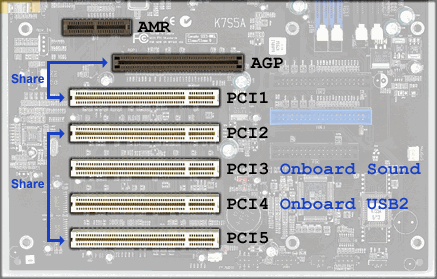
Pulsar is in the second lowest slot. But I have disabled USB in the BIOS (before installing winXP).
<font size=-1>[ This Message was edited by: Immanuel on 2002-02-18 10:49 ]</font>
-
subhuman
- Posts: 2573
- Joined: Thu Mar 29, 2001 4:00 pm
- Location: Galaxy Inside
Put Pulsar in PCI2, leave PCI5 empty. Then the IRQ won't be the problem, so onto the next step, which is installing <a href=http://www.sis.com/support/driver/index.htm>drivers</a> for your motherboard.
-
Immanuel
- Posts: 3018
- Joined: Thu Oct 25, 2001 4:00 pm
- Location: Aalborg, Denmark
Durring my work finding out, wich drivers to install, I passed by the ocworkbench forum and in their k7s5a FAQ I found this -> http://forum.ocworkbench.com/ocwbcgi/ul ... 4&t=002018. Step five explains, that you need to run siside.exe to enable DMA.
Thanks for the inspiration so far. I will now move my Pulsar1 from slot 4 to 5 (I hope XP can manage that without forcing me to uninstall Pulsar and reinstall)
Immanuel
Thanks for the inspiration so far. I will now move my Pulsar1 from slot 4 to 5 (I hope XP can manage that without forcing me to uninstall Pulsar and reinstall)
Immanuel